4 Way Video Calls on iPad


Last month Fring released an iPad optimized version of their app that can do 4-way video calling. Now you can talk to 4 people at once and because the screen is cut in 4 you can see everyone.

You can make the video calls over 3G as well as WiFi and as an added bonus, Fring is a multi platform app. You can use it to talk and video chat with your friends even if they have an Android device.

I can't help but think about ways to use this in education. 


Imagine using this app in the classroom to:
1. Connecting with Experts
2. Creating Virtual Field Trips
3. Great Group Work
4. Connecting with other Schools
5. Conducting Interviews
6. Professional Development
7. Collaborating with other classes
8. Connecting with students in other countries
9. Sharing an overseas holiday with other students
10. Small Groups Tutorials


Read More Add your Comment 0 comments


Google just used its Search app to sneak most of Chrome OS onto the iPad


Great news from Google highlighted in an article from Matthew Panzarino over at TheNextWeb. I have had a play with this app and love it. It is super clean and so nice to use. I love that I can incorporate all my pictures, google docs and other google tools so easily on my iPad.


With the announcement of its new Search app, Google gave iPad users more than just a slick and well-made native search app that bests the experience on any Android tablet. It also managed to squeeze the core elements of Chrome OS into Apple’s ecosystem.
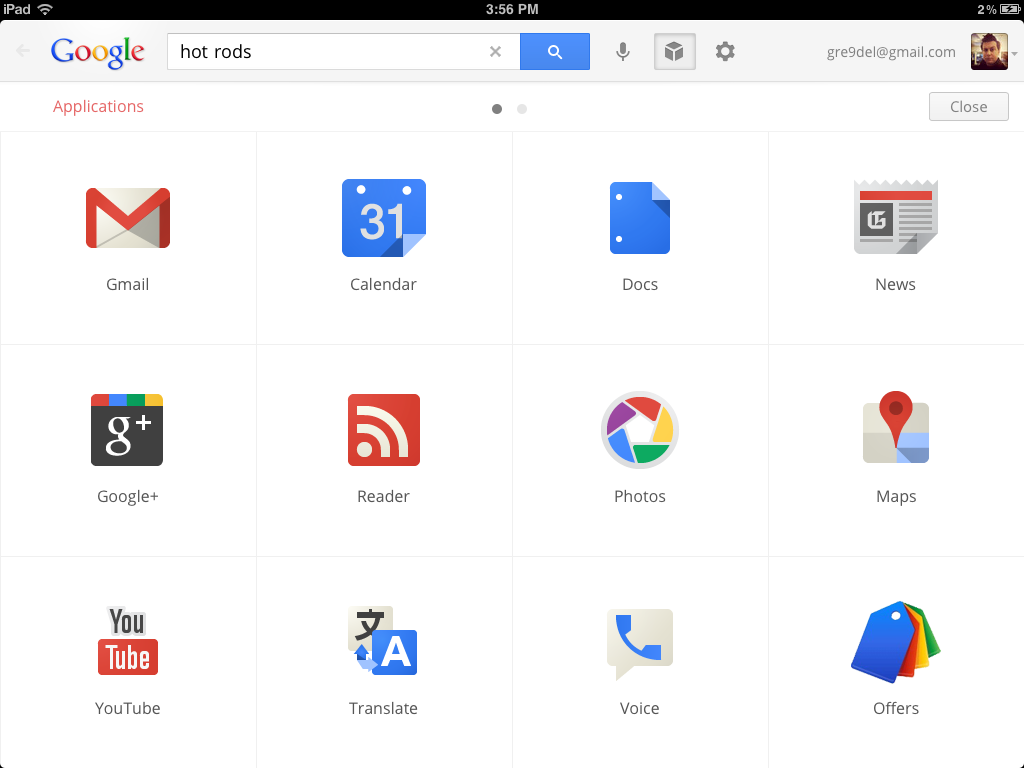
Note that I say core elements, because there are aspects of Chrome OS that are obviously not represented here, but it is definitely a huge step in the right direction.
When you launch the new Google Search app, you’ll notice right away that there is a huge difference between it and the much maligned gmail app for iOS. The Gmail app uses a webview for its main component, which in the world of iOS apps is the equivalent of being lazy.
But I have it on good authority that the team that built this app is a completely separate endeavor. What I don’t know, but suspect, is that the team within Google that built this app has ties to the Chrome OS team.
The Search app is built using native controls, which give it a silky smooth operation and that feeling of quickness that doesn’t come easily to an app that is built on a thinly wrapped webview. It also means that you’re greeted with an interface immediately, rather than waiting for a webpage to load.
photo 17 520x390 Google just used its Search app to sneak most of Chrome OS onto the iPad
But the main feature of the app, which is really a simple and gorgeous implementation of Google Search, isn’t the most interesting bit here. To find that, just tap on the Applications button on the main screen.
From here, you have access to the following Google products, all within an iOS wrapper: Gmail, Calendar, Docs, News, Google+, Reader, Photos, Maps, YouTube, Translate, Voice, Offers, Finance, Books and Blogger.

Read full article:
http://thenextweb.com/google-just-used-its-search-app-to-sneak-most-of-chrome-os-onto-the-ipad/


Read More Add your Comment 0 comments


80 Apps to Learn a New Language


Below you’ll find 80 apps for learning a number of different languages: everything from Chinese to sign language! A few of the apps come in multiple language variations so if you find one you like in a given language, keep scrolling to see if there are other versions. This is a fabulous article written by Joshua Johnson over at AppStorm. Make sure you check out the rest of their site.


Read More Add your Comment 0 comments


Apps for Project Based Learning: Learning in Hand


We have posted about Tony Vincent's Learning in Hand site before. It is a fantastic resource for mobile learning. He does a lot of work around iPads but is interested in ensuring that the learning is authentic. Here is has put together a compilation of apps specific for those school working in the Project Based Learning arena. Make sure that you check out the rest of his site - Learning in Hand


Read More Add your Comment 0 comments


iPads in Schools LiveBinder


This is one of the most comprehensive iPad Resources on the net - iPads in Schools Livebinder. Lots of people will already know about this one but if you do not, it is an absolute wealth of resources. Make sure you check all the tabs across the top. Collected and maintained by Mike Fisher it is the one place that I continue to return to ensure that I am up to date with any of the new resources being built around iPads in education.

It is however only one of the 8 or 9 fantastic Livebinders that Mike has created. Make sure you also check out his website Digigogy.com for some great 21st century teaching resources. Mike Fisher is getting lots of nominations for the Edublogs Awards - well worth a look.


Read More Add your Comment 0 comments


Pen and Touch Inspiration


Wacom is a lot more than just Bamboo Paper and a cool Stylus in funky colours. I was invited to a recent product launch by Wacom Australia. I was interested because I wanted to see if these products could be utilised within a school setting. The launch was really about the new CintiQ 24HD - a beautifully designed interactive pen display on a massive 24" widescreen workspace. This is the flagship of their product range and sets a new standard for professionals working in 3D design, animation, game development, industrial design and visual effects.

The launch did however also re-introduce the full range of Wacom products - CintiQ, Interactive Pen Displays, intuos tablets and of course their Stylus and Bamboo Paper app. The most impressive of these from a educational point of view was probably the Bamboo Tablet range. These tablets and the ultra responsive pens are a far cry from the original tablet devices. The Wacom tablet and pen combinations come in 4 models, all moderately priced and well within the budget constraints of most schools.

One of the most impressive things about the Wacom products are the institutions that have aligned themselves with Wacom products. The Enmore Design Centre - Sydney Institute is a design school that Ikea has bought designs straight from the students. Wacom have also been involved in some innovative projects - the best is probably the Advanced Teaching Concept Space at the University of Queensland. 

By coincidence I had a number of students at my school who happened to be using Wacom tablets to produce artworks for their Higher School Certificate Body of Work. The students were the ones that sold me on the quality and features of the Wacom tablets.

The tablet works directly with the image manipulation software that you are using and is simply connected via USB. The pens are wireless. These tablets are a great example of why iPads may not be your only choice of device within a school or department. 


The beauty of the pen is the balanced and responsive feel of it whilst in the drawing process. Many students were more comfortable achieving their effects using the pens as opposed to a mouse. The pen made them feel more like they were actually drawing and they were able to create a better nuance in the use of line and depiction of colour. The nib is touch sensitive - the more you press the wider the line or more intense the colour. The pen allowed the students to create a quick and productive workflow that meant that some of these illustrations were created within relatively sort period of time.


So, this is the challenge. A challenge not to discount other devices simply because they are not iPads. These tablets are certainly one of those devices that fall into the category of non-traditional teaching aids but I know people who now exclusively use tablets and have totally given up using a mouse at all.

The young man who produced these works is exceptional, rarely have I seen works of this quality from a 17 year old student. Having said that I have also seen some absolutely wonderful artworks produced on the iPad. There is no reason why you could not attempt this style of portraiture using any number of iPad apps but there are other devices for creating artwork within the digital format. We need to keep an open mind.


Read More Add your Comment 0 comments


iDevices in the Science Lab


Can you record what you see in a microscope using an iDevice. One of the Science teachers came into the staff room very excited yesterday. She had been working with her senior science class with the normal light microscope looking at red and white blood cells at 400X. They were discussing how they could document their experiment. One of her students just grabbed his iPhone, placed it on the eyepiece of the microscope and took a photograph. Here are the resulting images.

The pink dot in the top left corner is a white blood cell
These images where use to grid up and count the cells before drawing the diagram.

This was so good because the NSW Biology Stage 6 Syllabus states that students must:

  • use a technique using prepared slides and
  • measure the field of view
Module 9.2 includes a section on Maintaining a Balance. In Section 2 the second practical bullet point is

  • performs a first hand investigation using the light microscope and prepared slides to gather information to estimate the size of red and white blood cells and draw scale diagrams of each
The beauty of this is not the use of technology itself but that the technology increased motivation and the subsequent task became easier to perform. The drawing and documentation became a real learning experience and the students were able to contribute to their own learning by discovering new ways of documenting their own experiments.

It would be easy to take this further again. Looking at hormones under an electron microscope would give you beautiful images of crystalline structures. This opens up some great links between art and science. This is itself a discussion that has gained attention lately and one area where a cross curricula project could be beneficial to develop.

Progesterone, Estradial, Estrone, Methhotrexate, Testosterone,and Diethylstilbeshol
These are images of hormones as seen under a microscope, from the National High Magnetic Field Laboratory at Florida State University.

I would love to hear how you have used iDevices in your science lessons. Include them in the comments section so we can share these ideas with others. Science teachers do get to do some pretty cool stuff.


To see what is possible check out Princeton University's 2011 Art of Science winners.


Related Article: Great microscope accessory
http://appsineducation.blogspot.com/2011/04/ipad-accessories-for-learning.html


Read More Add your Comment 0 comments


© 2010 Apps Education All Rights Reserved Thesis WordPress Theme Converted into Blogger Template by Hack Tutors.info