ArtSet - Great for building confidence in young artists
ArtSet was an impressive app that I was introduced to last week. I was presenting at a conference and one of the organisers asked if a number of the presenters could go through a workflow to illustrate how a series of apps might be able to be used to deepen student learning. The idea was the the product of one app would become the input for the next. The story of The Lion and the Mouse was suggested as an idea. Each presenter was given three minutes only. There was a cross section of both primary and secondary teachers in the group.
I was lucky to be the first person and simply did a demonstration of drawing a lion using Artset. The next person then took the image and put it into WordFoto using words students might use to describe a lion. This could be easily developed further into a language lesson. Then they used Comic Touch to illustrate the Lion's thoughts and feelings.
.JPG)
.JPG)
 |  |  |  |  |  |
 Read More
Add your Comment
0
comments
Read More
Add your Comment
0
comments
IWB, Mirroring Apps or Apple TV? Big iPad Decisions
There has been a great discussion forum within our school system about iPads, Interactive Whiteboards (IWBs) and sharing student's work. It started with a question from a teacher just wanting to connect their iPad to the IWB. What followed has been a great discussion about classroom practice and workflows.
We have all spent time and energy creating resources for our IWB but is it time we move to new technology. We can in fact connect our iPads to an IWB via the VGA Adaptor but would you choose to if you had other options.
 There are many tools out there that give us this functionality. Tools like AirServer and Reflector are good for this because they create a link to a laptop that you have connected to your projector and therefore the iPad is shared with a group of people. For many people this is a great solution. For appropriately $15.00 you have a good way to share your iPad and maintain all its interactivity.
 Read More
Add your Comment
0
comments
Read More
Add your Comment
0
comments
Skitch Primary Poster
This is the second in a series of posters for supporting Primary students in an iPad environment. I love Skitch as a tool for my students to show me what they have learnt. I know a lot of the students navigate freely within the touch and swipe environment but this is for those little ones who might forget what some of the buttons do.
 Read More
Add your Comment
0
comments
Read More
Add your Comment
0
comments
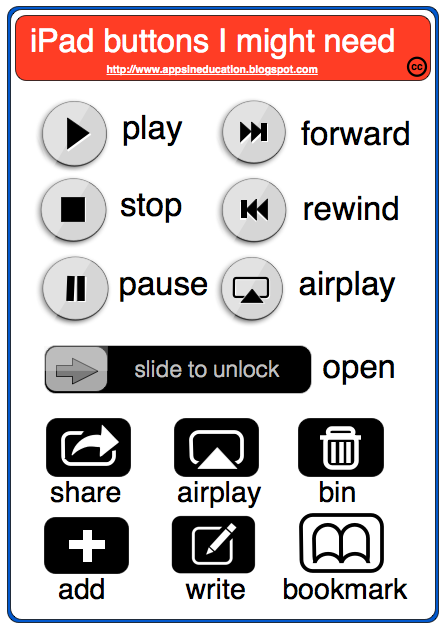
iPad Poster for Primary School
 Read More
Add your Comment
0
comments
Read More
Add your Comment
0
comments
New Google App Search Feature
A friend of mine @miss_martins tweeted a great find today on Google. It is a search feature just for apps. Type in any subject or category and let Google bring the apps to you. This is a great new feature from Google.
 Read More
Add your Comment
0
comments
Read More
Add your Comment
0
comments
Video inside your Google Drive App

 I am lucky enough to be attending a Google Apps Summit today in Sydney, Australia. Whilst I have seen heaps of very cool tips, tricks and new features for apps one of the most impressive for me was the ability to Video from within your iOS Google Drive app. We all know that some of the Google products do not have full functionality on the iPads, yet. The new features being enabled does seem to happen regularly - sometimes daily.
This new feature of Google Drive (well new to me anyway) is one that I can see having a huge benefit within the classroom.

1. The students simply open their Google Drive app go to the + icon in the top right hand corner.

2. Select Use Camera. This opens a small window in the top right hand corner of the screen and you can take photos or video. As you can see you even have the option to upload existing ones.

3. The photo or video is taken and then you are given the opportunity to use it or not. if you chose Use it, it is automatically saved to your My Drive. Look for your little Google Movie Icon to appear in your my drive. This is a great way to move video onto and off the iPad.
I love this! I can't wait to get this into the hands of a group of kids to see what other ways we can this feature.
Read More
Add your Comment
0
comments
Collaborative App Guide for the Classroom - Monique Dalli (Guest Blogger)
I came across a tweet about iPad apps yesterday from @1moniqued and was impressed with a Google Doc she had started. I thought it might be something that we could crowd source further. I am going to hand over to Monique now so she can explain her concept.
 Read More
Add your Comment
0
comments
Read More
Add your Comment
0
comments
 Previous Article