Real-time Collaborative Whiteboards for Distance Education
 SyncSpace: $8.49 AU
https://itunes.apple.com/au/app/whiteboard-hd/id383779666?mt=8

http://itunes.apple.com/au/app/jot!-whiteboard/id376133340?mt=8

https://itunes.apple.com/au/app/syncpad/id544015104?mt=8

Groupboard turns your iPad into a collaborative whiteboard, allowing you to draw and chat in real time with anyone on the internet, even with users using a web browser. Use it for online tutoring or collaboration! Simple to use - simply start the app and then draw on the screen by dragging your finger. Use two fingers to scroll and zoom. Click Connect tab to connect with other people.
https://itunes.apple.com/au/app/groupboard-whiteboard/id364049817?mt=8

BaiBoard is a collaboration canvas with a drawing interface. You can import or share documents from Dropbox, GDocs, Email, iTunes and Evernote. It has a variety of drawing tools and built-in stencils and you can publish and share your ongoing BaiBoard sessions via social media. View Canvas and PDF from any computer or device on same network using web browser.
https://itunes.apple.com/au/app/baiboard-whiteboard/id490534358?mt=8
 Read More
Add your Comment
0
comments
Read More
Add your Comment
0
comments
Music Apps for the High School Classroom

MSOLearn - FREE
https://itunes.apple.com/au/app/mso-learn/id441422027?mt=8

The only sight reading app that can train all 88 keys with sharp, natural, flat in the context of all key signatures. Whether you are new and slow on piano sight reading or just someone who wants to improve on your overall piano sight reading abilities and ear training skills, this is the right app for you. Students learn and practice both treble clef and bass clef notes on 88 keys
https://itunes.apple.com/au/app/sight-reading-hd-free/id495281740?mt=8

Enjoy 120 of the World’s greatest classical masterpieces performed by the best orchestras and ensembles around the world! Familiarize you with Classical Standards constantly heard in life events, movies, TV shows... Beethoven, Mozart, Bach, Chopin, Tchaikovsky. Discover and learn more with YouTube live performances and Wikipedia composer info for each masterpiece.
https://itunes.apple.com/au/app/classical-music-i-masters/id388835399?mt=8

SyncScore provides wide variety of classical music with its synchronized scores. Browse a library of hand-picked tracks, composed by composers like Bach, Mozart, Beethoven, Chopin and more. SyncScore is the ultimate hub for various SyncScore apps that contain full tracks of the album. Scroll automatically as the music proceeds.
https://itunes.apple.com/au/app/syncscore-classical-music/id561892747?mt=8

Jam can turn anyone into a rock star with their own virtual band. Sing anything into your device and Jam will turn it into an original musical Masterpiece, regardless of your musical ability. Simply select a musical style and tempo then hit record. Jam detects the incoming vocal pitch, musical key and song structure, then it auto-tunes the vocal and produces original backing music to suit.
https://itunes.apple.com/au/app/jam-for-iphone/id580366563?mt=8

Beethoven’s 9th Symphony for iPad presents four of Deutsche Grammophon’s legendary recordings of this iconic work, with the amazing ability to switch instantly between each performance at any point in the piece. As you listen, you can watch the synchronized musical score, be guided by expert commentary or follow Beethoven’s 1825 manuscript.
https://itunes.apple.com/au/app/beethovens-9th-symphony/id601942399?mt=8

Explore the incredible variety of classical chamber orchestra music, with a growing library of more than 250 free and complete works performed by The Saint Paul Chamber Orchestra, one of the world’s leading professional chamber orchestras. You can also learn more about the orchestra’s virtuoso musicians and find upcoming concerts.
https://itunes.apple.com/au/app/spco-classical-listening-library/id541145825?mt=8

It's a Book: Create, edit, print, share and collect chord charts of your favorite songs for reference while practicing or performing. It's a Band: Practice with a realistic sounding piano (or guitar), bass and drum accompaniments for any downloaded or user-created chord chart. The basic play-along feature includes Jazz Medium Swing, Bossa Nova and Rock. Transpose any chart to any key.
https://itunes.apple.com/au/app/ireal-b-music-book-play-along/id298206806?mt=8

The Sydney Symphony is the easiest way to follow Sydney Symphony. Now you have access to Sydney Symphony's music at anytime, anywhere. Listen to selected Sydney Symphony live recordings on your mobile device. All repertoire information including composers, works, soloists, conductors and ensembles is included. View artwork and program notes with high quality audio.
https://itunes.apple.com/au/app/sydney-symphony/id419954219
Read More
Add your Comment
0
comments
iPad Apps Art eBook - Van Gogh
An Art eBook on Van Gogh was one of the first ebooks I did with a group of students. I wanted to give them the opportunity to contribute to their own learning so we threw out the old unit of work and sat down together to write a new one. We had been doing a lot of our work on Web 2 tools and so the book was based on browser based tools. I have posted about our collaborative textbooks on one of my other blogs Edtechtoolbox. People have commented on the design aspects of these books but all were made in Pages and then uploaded as a pdf. The students were very proud of their publication.
A couple of months ago I thought it would be an interesting exercise to see if I could replicate the eBook with iPad Apps as opposed to Web 2.0 tools. This is the result. I know already that there would be a few apps that I would update or change but this will always happen.
If it doesn't open on your iPad follow this link Van Gogh Apps Textbook
Read More
Add your Comment
0
comments
ArtSet - Great for building confidence in young artists
ArtSet was an impressive app that I was introduced to last week. I was presenting at a conference and one of the organisers asked if a number of the presenters could go through a workflow to illustrate how a series of apps might be able to be used to deepen student learning. The idea was the the product of one app would become the input for the next. The story of The Lion and the Mouse was suggested as an idea. Each presenter was given three minutes only. There was a cross section of both primary and secondary teachers in the group.
I was lucky to be the first person and simply did a demonstration of drawing a lion using Artset. The next person then took the image and put it into WordFoto using words students might use to describe a lion. This could be easily developed further into a language lesson. Then they used Comic Touch to illustrate the Lion's thoughts and feelings.
.JPG)
.JPG)
 |  |  |  |  |  |
Read More
Add your Comment
0
comments
IWB, Mirroring Apps or Apple TV? Big iPad Decisions
There has been a great discussion forum within our school system about iPads, Interactive Whiteboards (IWBs) and sharing student's work. It started with a question from a teacher just wanting to connect their iPad to the IWB. What followed has been a great discussion about classroom practice and workflows.
We have all spent time and energy creating resources for our IWB but is it time we move to new technology. We can in fact connect our iPads to an IWB via the VGA Adaptor but would you choose to if you had other options.
 There are many tools out there that give us this functionality. Tools like AirServer and Reflector are good for this because they create a link to a laptop that you have connected to your projector and therefore the iPad is shared with a group of people. For many people this is a great solution. For appropriately $15.00 you have a good way to share your iPad and maintain all its interactivity.
 Read More
Add your Comment
0
comments
Read More
Add your Comment
0
comments
Skitch Primary Poster
This is the second in a series of posters for supporting Primary students in an iPad environment. I love Skitch as a tool for my students to show me what they have learnt. I know a lot of the students navigate freely within the touch and swipe environment but this is for those little ones who might forget what some of the buttons do.
 Read More
Add your Comment
0
comments
Read More
Add your Comment
0
comments
iPad Poster for Primary School
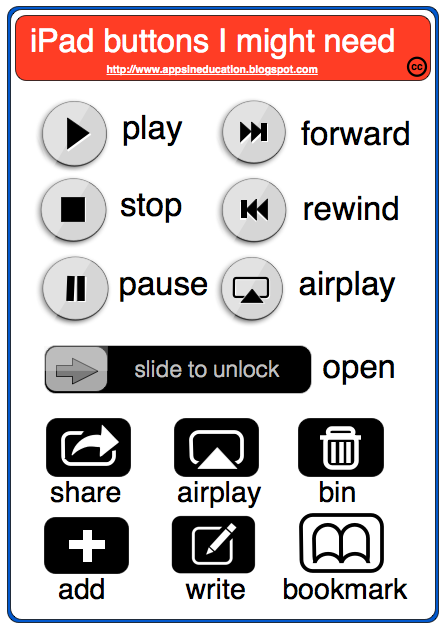 Read More
Add your Comment
0
comments
Read More
Add your Comment
0
comments
 Previous Article