IWB, Mirroring Apps or Apple TV? Big iPad Decisions
There has been a great discussion forum within our school system about iPads, Interactive Whiteboards (IWBs) and sharing student's work. It started with a question from a teacher just wanting to connect their iPad to the IWB. What followed has been a great discussion about classroom practice and workflows.
We have all spent time and energy creating resources for our IWB but is it time we move to new technology. We can in fact connect our iPads to an IWB via the VGA Adaptor but would you choose to if you had other options.
 There are many tools out there that give us this functionality. Tools like AirServer and Reflector are good for this because they create a link to a laptop that you have connected to your projector and therefore the iPad is shared with a group of people. For many people this is a great solution. For appropriately $15.00 you have a good way to share your iPad and maintain all its interactivity.

 Read More
Add your Comment
0
comments
Read More
Add your Comment
0
comments
Skitch Primary Poster
This is the second in a series of posters for supporting Primary students in an iPad environment. I love Skitch as a tool for my students to show me what they have learnt. I know a lot of the students navigate freely within the touch and swipe environment but this is for those little ones who might forget what some of the buttons do.
 Read More
Add your Comment
0
comments
Read More
Add your Comment
0
comments
iPad Poster for Primary School
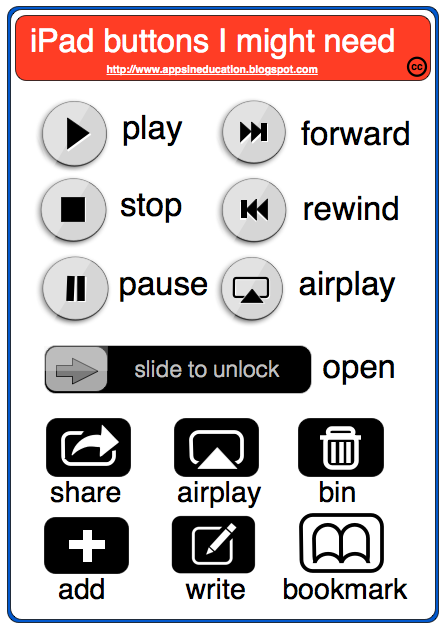 Read More
Add your Comment
0
comments
Read More
Add your Comment
0
comments
New Google App Search Feature
A friend of mine @miss_martins tweeted a great find today on Google. It is a search feature just for apps. Type in any subject or category and let Google bring the apps to you. This is a great new feature from Google.
 Read More
Add your Comment
0
comments
Read More
Add your Comment
0
comments
Video inside your Google Drive App

 I am lucky enough to be attending a Google Apps Summit today in Sydney, Australia. Whilst I have seen heaps of very cool tips, tricks and new features for apps one of the most impressive for me was the ability to Video from within your iOS Google Drive app. We all know that some of the Google products do not have full functionality on the iPads, yet. The new features being enabled does seem to happen regularly - sometimes daily.
This new feature of Google Drive (well new to me anyway) is one that I can see having a huge benefit within the classroom.

1. The students simply open their Google Drive app go to the + icon in the top right hand corner.

2. Select Use Camera. This opens a small window in the top right hand corner of the screen and you can take photos or video. As you can see you even have the option to upload existing ones.

3. The photo or video is taken and then you are given the opportunity to use it or not. if you chose Use it, it is automatically saved to your My Drive. Look for your little Google Movie Icon to appear in your my drive. This is a great way to move video onto and off the iPad.
I love this! I can't wait to get this into the hands of a group of kids to see what other ways we can this feature.
Read More
Add your Comment
0
comments
Collaborative App Guide for the Classroom - Monique Dalli (Guest Blogger)
I came across a tweet about iPad apps yesterday from @1moniqued and was impressed with a Google Doc she had started. I thought it might be something that we could crowd source further. I am going to hand over to Monique now so she can explain her concept.
 Read More
Add your Comment
0
comments
Read More
Add your Comment
0
comments
Cool Maths apps for kids
Maths Apps are the ones most frequently searched for on this site. I sometimes think that if I had some of these apps I would have taken a greater interest in Maths as a kid. It was not that I was disinterested I just missed some of the basics. With some of these game based apps at least students can be engaged long enough to discovery some of the basic maths concepts.
The first two were developed by an Australian App Company called GetShinyThings. I need to let you know that these guys contacted me and sent over a couple of redeem codes. Having said that I am always impartial but also happy to promote Australian content designed and produced by Australian developers - good job guys. Anyway have a look and see if any of these would be appropriate for your little mathematicians. Jungle Picnic: $2.99 AU
Jungle Picnic is a funky learning app for preschool children with very cool graphics. The concepts are all about recognising shapes, numbers and colours. The engaging characters certainly add to the motivation, as does the growing complexity of tasks. This is all done with familiar objects and themes. Jungle Picnic bridges the gap between informal learning and formal maths instruction.
https://itunes.apple.com/au/app/jungle-picnic/id550930045?mt=8 Sakura Quick Maths: $1.99 AU
I have spent some time on this app and enjoyed the self competition it fosters. You practice your maths while racing the clock. The app features handwriting recognition which is pretty cool. Quick Maths is perfect for students to improve their all round mathematics ability. The multiple difficulty levels allows the app to grow with your skills. You can also tweet your best scores - great motivator
https://itunes.apple.com/au/app/sakura-quick-math/id537802071?mt=8 Number Run: $1.99 AU
Baron von Count has stolen the 4 Mathemagical crystals of the land. Chase him down and bring him to justice or humanity will be forced to count on their fingers forever! Number Run is great practice for boys and girls learning math. Finally, a FUN math game featuring 52 levels across addition, subtraction, multiplication, and division that is also aligned to Common Core state standards.
https://itunes.apple.com/au/app/number-run/id563408572?mt=8 Maths with Mouse: FREE
We are going on a treasure hunt and only math can help us. From easy problems to the difficult ones, studying little by little we'll unveil the map and discover the treasure. All math problems are read aloud helping to connect aural memory. No incorrect answers. If a kid makes mistake, they can always count on a hint. Designed to be about discovery learning.
 Fruit Frenzy: $0.99
In this frantic puzzle game you'll match together fruit as fast as you can to score big points. This game has the magic combination of addictive gameplay, great graphics and toe-tapping music that will keep you coming back for more. The unique row-sliding gameplay makes this game different to any other! Three different games modes to keep all kids challenged and engaged.
https://itunes.apple.com/au/app/fruit-frenzy/id416810370?mt=8
 DinoMath: FREE
DinoMath uses a fantasy map with 5 different levels. The levels are initially locked until the player has earned high scores while navigating around the levels on the map. Eventually questions are timed and begin to include subtraction. Players are rewarded with coins for correct answers. They can later use those coins to unleash dinosaur-themed artwork that ROARS back at them.
https://itunes.apple.com/au/app/dinomath/id527739772?mt=8
 Math-QuizUp: FREE
Perfect for students new to arithmetic or adults who want to hone up on their mental math, Math QuizUp lets you compete in real time against other players around the world. Are you speedier at subtraction then someone in Sweden? Can you defeat a Canadian at division? Find out with real time global and national rankings.
https://itunes.apple.com/au/app/math-quizup/id571238901?mt=8
 Numbers League: $4.49
 In Numbers League only the clever use of basic math skills will save the day. The more you play the sharper these skills will become until no villain is safe from your numerical onslaught. The Minion-level game can be mastered by a five year old, the Superhero-level game will challenge even math-savvy parents and teachers, and Custom levels allow for a learning experience anywhere in between.
https://itunes.apple.com/au/app/numbers-league/id444781544?mt=8
 Bugs and Numbers: $2.99
https://itunes.apple.com/au/app/bugs-and-numbers/id577575295?mt=8
 3D Maths Racing Pro: $0.99 AU
3D Maths Racing Pro will have your students begging you to practice their Maths Skills. In this crazy 3D racing game you get a speed boost for every problem you solve. It is The game is customizable so you can use it with students in multiple grade levels. If you have boys (or girls) who are reluctant to practice their math facts then this may be part of the answer.
Read More
Add your Comment
0
comments
 Previous Article